Does Sigsync Email signature service limit messages in Office 365?
You would like to know if Sigsync Office 365 Email Signatures affect the Office 365 mail sending limit on a daily basis.
Resolution:
In Office 365, each mailbox has a defined limit for the number of recipients that can receive emails from it within a 24-hour period. The daily recipient limit is 10,000, and any messages sent beyond this threshold will not be delivered.
The recipient rate is calculated as follows:
- Every email sent from a mailbox counts toward the limit.
- If multiple emails are sent to the same recipient, each instance is counted separately.
The Sigsync service does not interact with or modify Microsoft’s recipient counting mechanism, and therefore has no impact on the recipient limit.
- Client-side signatures: These are added directly in Outlook while composing an email. Since the signature is inserted before the message is sent, it does not affect the recipient count in any way.
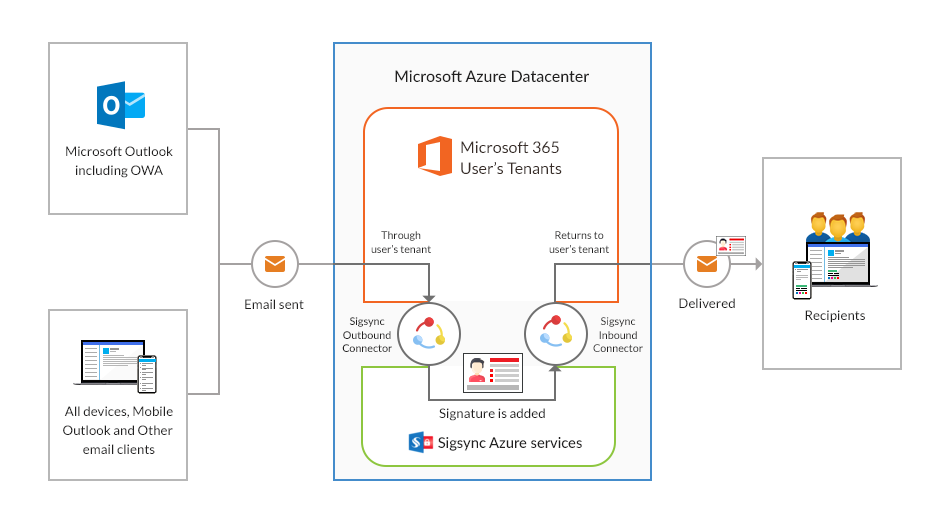
- Server-side signatures: When using this mode, messages reach the Sigsync service after leaving your mailbox, at which point the recipient count has already been registered by Office 365. Sigsync then attaches the signature and resubmits the email to the Office 365 submission queue. Hence, it also does not influence or increase the recipient limit count.
Experience Smarter Email Signatures with a
Free Sigsync Demo
Sigsync email signature service provides effortless, centralized signature management for Office 365 and Exchange.
Our team can assist you in quickly setting up company-wide signatures. Request a free on-demand demo to see
how Sigsync can simplify your email signature management process.