Professional identity
Full name, title and practice area, plus bar admissions or jurisdictions where your firm lists them.

Explore how our solution delivers efficiency, control, and scalability.
Request a Demo
Explore how our solution delivers efficiency, control, and scalability.
Request a Demo
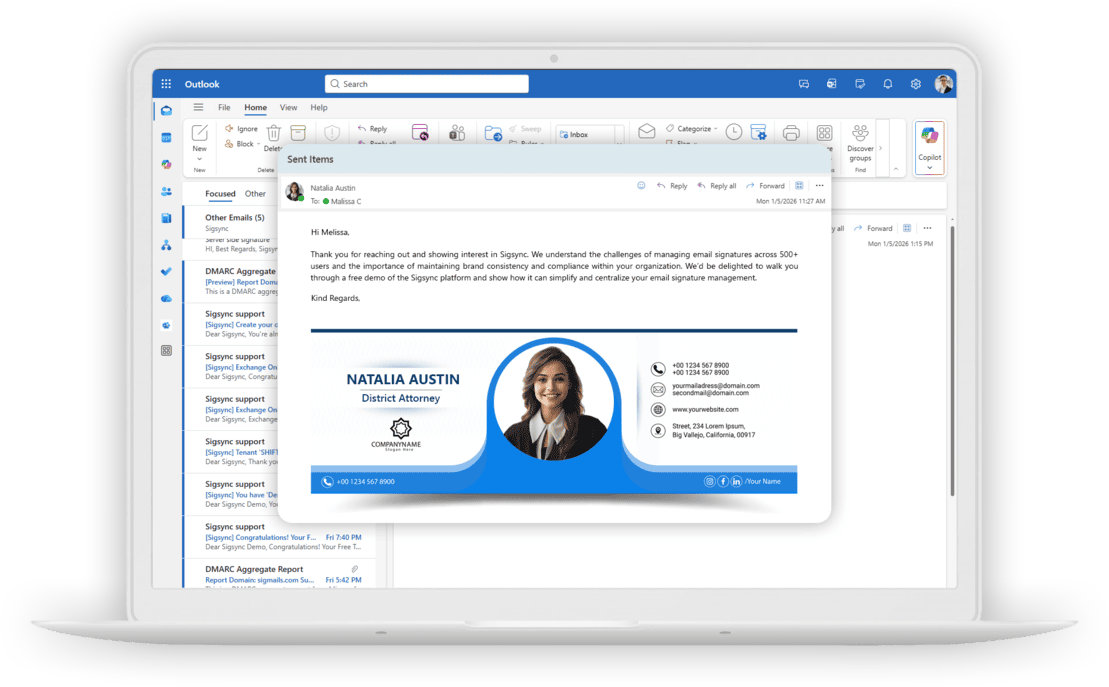
Keep attorney details, firm branding and approved legal email disclaimers consistent across every law firm email signature in Microsoft 365.
150M+
Signatures Delivered Monthly
99.99%
Service Availability
150+
Countries Served
5000+
Organizations Trust Sigsync
Without centralized control, a single non-compliant email
from any lawyer, paralegal, or staff member can expose your firm to
serious liability.

Manual signature setups mean lawyers on mobile devices or new starters often send emails with no disclaimer at all, a compliance failure waiting to happen.

After an office move, merger or rebrand, old disclaimer wording and addresses can stay in use because each person maintains their own signature.

Without central control it is hard to show which signature and disclaimer went out with an email. The optional Signature in Sent Items setting and the Activity Log support record-keeping.
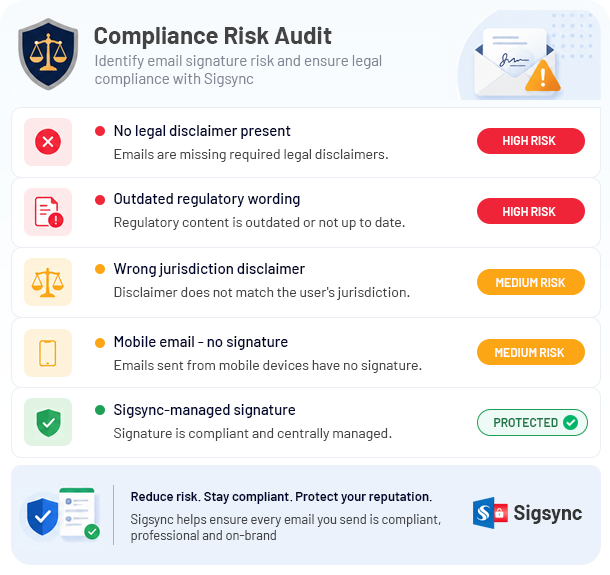

Sigsync provides centralized governance for email signatures, helping organizations mitigate compliance risks, enforce legal disclaimers, and maintain consistent branding across all communications.


Append jurisdiction-specific disclaimers to every outbound email automatically including emails sent from mobile devices, Outlook, and OWA. No user action needed.

Manage signatures and disclaimers for your entire firm from a single web-based portal. Update the template once and the change applies to everyone covered by the rule.

Sigsync pulls each user's details name, title, direct dial, office — directly from your Active Directory. Signatures stay accurate without any manual data entry.

Assign different signature templates and disclaimer text to different departments, offices, or seniority levels. Each practice group gets exactly the right signature.

Server-side signature injection means compliant disclaimers are applied after every email is sent — regardless of whether the sender is on desktop, tablet, or mobile.

Optionally include the full signature in Sent Items, giving you a complete and accurate audit trail of every email sent — critical for legal record-keeping.
Attorney details
Use a consistent template for the details your firm chooses to publish. Microsoft 365 user properties and configured custom fields can supply attorney-specific information.
Full name, title and practice area, plus bar admissions or jurisdictions where your firm lists them.
Direct dial, mobile number and the correct office address, together with your firm’s logo and approved branding.
Confidentiality and privilege wording, and any attorney advertising notice your firm determines is required.
Your firm remains responsible for approving disclaimer wording and deciding which information to include for each jurisdiction.
Go beyond simple text formatting. Sigsync offers
enterprise-grade functionality to automate
the most complex signature
requirements smoothly.

Integrates deeply with Microsoft Entra ID (Azure AD). When a lawyer is promoted, their signature title updates after the next directory synchronization, without manual intervention.

Run different banners for different practice groups. Promote the M&A webinar below the M&A team’s signatures, and the new Chambers ranking below the Litigation team’s. See email signature marketing for scheduling and tracking.

Give the marketing team access to update promotional banners while restricting them from modifying structural disclaimer policies assigned to IT or Risk Management.

Use different signature templates and disclaimers for different practice groups and offices, based on the sender's Microsoft 365 group.
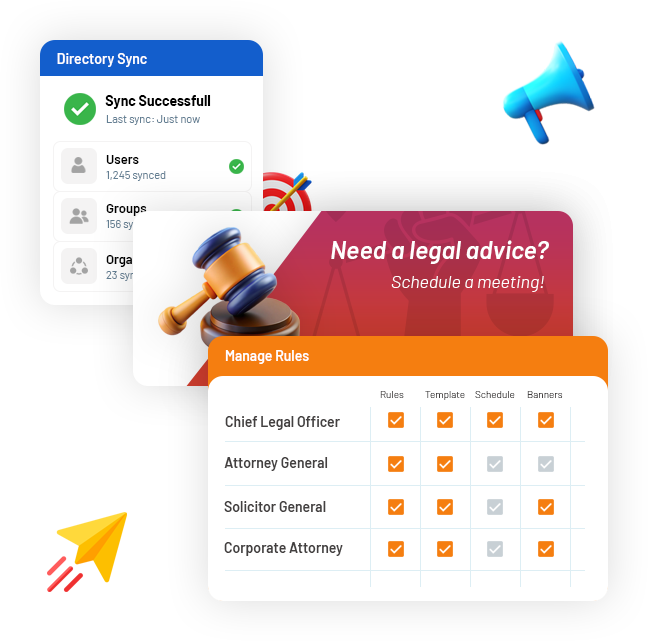
Recipient rules
Use a full firm-approved notice for external correspondence and a shorter version for internal messages where appropriate.
Sigsync recipient rules distinguish internal and external recipients and can target specific domains or addresses.
Central control
Manage signature templates centrally and apply them after sending. Ordinary senders do not edit the server-added disclaimer in their composing window.
Only account owners and authorized admins can change templates or rules. The Activity Log records administrative actions for review.
Security review
Review mail handling, authentication and regional configuration before connecting a service to your firm’s email flow.
Emails pass through Sigsync to add signatures. Email content is not retained or read by personnel.
Sigsync reports a SOC 2 Type 2 audit, is certified for ISO/IEC 27001 and follows ISO/IEC 27018 standards. Review its GDPR, HIPAA and Data Processing Agreement documentation.
OAuth 2.0 access tokens, support for MFA-enabled accounts and TLS-encrypted mail connections protect authentication and transmission.
Choose the available geo location when adding your tenant and confirm that configuration meets your firm’s data-location requirements.
Sigsync also provides signatures and disclaimers for Exchange Server environments.
Review deployment and governance considerations on the IT solutions page with your risk and IT teams.
Yes. Sigsync centrally adds disclaimers to new emails, replies and forwards covered by your configured rules. Server-side processing applies them after sending, including messages from phones, tablets and Outlook on the web that are routed through Sigsync.
Yes. Rules based on the sender's Microsoft 365 properties, such as office, department or country, let each office or practice group send the disclaimer that applies to it.
Yes. Recipient-based rules separate internal recipients in your Microsoft 365 domains from external recipients, and can target specific domains or addresses, such as a key client or opposing counsel.
With server-side signatures, ordinary senders cannot edit the disclaimer added after sending from their composing window. The disclaimer is managed centrally; only account owners and authorized admins can change templates or rules.
Yes. Enable Signature in Sent Items to display the added signature and disclaimer in the sender’s Sent folder. Administrative actions are recorded in the Activity Log. These features support record-keeping but do not replace email archiving, retention or eDiscovery controls.
No. Emails pass through Sigsync to add signatures; email content is not retained or read by personnel. Review Sigsync’s security documentation for its SOC 2 Type 2 audit, ISO/IEC standards, privacy controls and Data Processing Agreement.

Sigsync has been a game changer for managing our Office 365 signatures. The setup was quick, and the interface is so easy that even non-technical staff can make updates without help. The pricing is fair compared to other tools we tried, and the value it offers is incredible...
See all G2 Reviews
We adopted Sigsync to maintain uniformity and professionalism in our communications across all departments and regions. The setup was straightforward, and support was responsive when we needed help with initial configuration...
See all Capterra Reviews
Sigsync has made managing email signatures across our organization incredibly simple. The level of control it offers over layouts, branding, and user groups is impressive. We can easily apply company-wide changes without affecting individual Outlook settings...
See all Microsoft AppSource Reviews
One of the standout features is the editor – it's highly flexible, with real-time previews and support for images, hyperlinks, social media icons, and more. We've also taken advantage of department-specific targeting, which ensures the team gets the correct signature...
See all SourceForge Reviews
Sigsync is the best Office 365 email signature service we have used so far. We were looking for a cost-effective solution to add email signatures throughout the organization but it was expensive to go with the other solutions...
See all SaaShub Reviews
We’ve been using Sigsync Email Signatures for Office 365 for several months now, and the results have been exceptional. As an organization looking for a streamlined and professional approach to email signature management, Sigsync ticked every box...
See all SoftwareSuggest Reviews
We were struggling to keep our signature consistent across devices until we discovered Sigsync. It automatically adds professional signatures from the cloud-even for mobile emails. The drag-and-drop editor is surprisingly powerful...
See all SoftwareWorld Reviews
Sigsync has been a real-time saver for us. Before, managing email signatures across our team was chaotic — different formats, outdated info, inconsistent branding. Since switching to Sigsync, everything is handled centrally, and it just works.
See all Trustpilot Reviews
The demo experience alone demonstrated how powerful and user-friendly Sigsync is. It eliminated any hesitation about deployment and highlighted the intuitive interface and automated features...
See all Slashdot ReviewsGet started with Sigsync today and free
your IT department from repetitive
signature management tasks.

 4.8 on G2
5000+ Organization
|Microsoft Approved
|No Credit Card Required

Experience Smarter Email Signatures with a
Free Sigsync Demo
Sigsync email signature service provides effortless, centralized signature management for Office 365 and Exchange.
Our team can assist you in quickly setting up company-wide signatures. Request a free on-demand demo to see
how Sigsync can simplify your email signature management process.


Hi, May I help you?
Hide Chat Now
