-
- Reseller
-
Products
Tailored Product Demo for Your Exact Needs
Explore how our solution delivers efficiency, control, and scalability.
Request a Demo
-
Solutions
Tailored Product Demo for Your Exact Needs
Explore how our solution delivers efficiency, control, and scalability.
Request a Demo
- Dashboard
- Features
- Pricing
Sigsync Email Signature Features
Sigsync makes email signature management simple. Create consistent signatures across all devices, ensure brand consistency, maintain compliance with disclaimers, promote your business with banners and build long lasting relationships with your customers and partners.

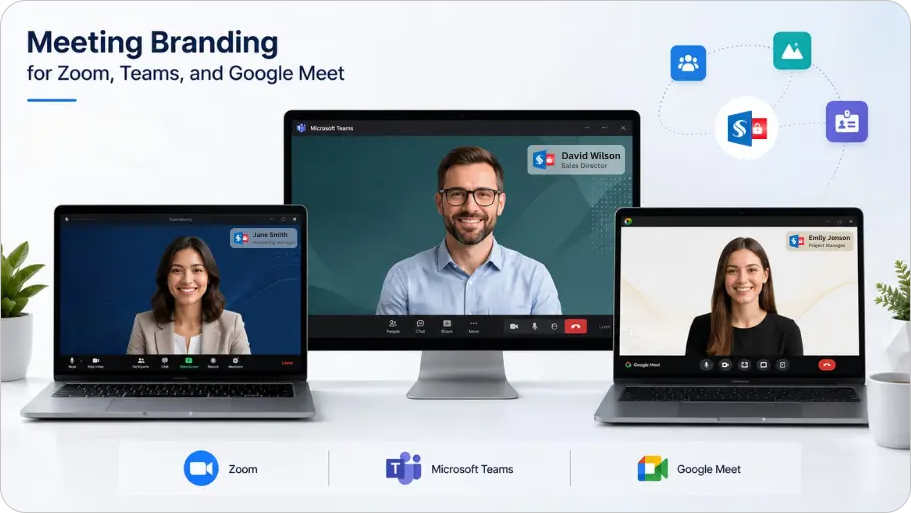
Meeting Branding for Teams, Google Meet and Zoom
Sigsync Office 365 Email Signature Management Software lets you integrate Meeting Branding into the same Brand Kit you already use for email signatures, so video call branding does not require a separate setup. Instead of employees joining calls with a mix of home offices and mismatched blurred backgrounds, everyone shows up with the same on-brand background and a name badge that fills in their name and job title automatically. Design the look once in your Brand Kit, assign it to the users or groups who need it, and it stays consistent across Zoom, Microsoft Teams, and Google Meet, as well as email, everywhere your team shows up.
Why a professional meeting background matters
A meeting background is one of the few brand touchpoints customers and partners see in real time, on a livecall rather than in a document they might skim.
- It sets the tone before anyone speaks: People form an impression of a call within the first few seconds. A clean, branded backdrop signals that the meeting is being taken seriously.
- It keeps calls looking uniform: When five people join a client call with five different backdrops, it looks disorganized even when the meeting itself goes well.
- It puts your brand in front of people: Every call becomes another low-effort chance for your logo and colors to register with the person on the other end.
- It builds trust: A polished setup tells people you pay attention to detail, which matters when someone is deciding whether to work with you.
What is Meeting Branding by Sigsync?
Designing one good background is the easy part. Getting the same background, with the right name and jobtitle showing, onto every employee's calls across Microsoft Teams, Google Meet, and Zoom is where mostcompanies run into trouble.
That is what Meeting Branding in Sigsync is built for. It uses the same logo, colors, and design assetsalready set up in your Sigsync Brand Kit, so your video call branding and your email signature branding comefrom one place. You design it once, and Sigsync keeps it consistent everywhere it is used.
Why teams choose Sigsync Meeting Branding
One design across three platforms
One background and name badge design applies across Zoom, Teams, and Google Meet, so IT is not managing threeseparate setups.
Name badges that fill themselves in
Employee names and job titles pull automatically from your Active Directory (AD), so nobody's stuck manuallyediting a name badge overlay.
Updates from one place
Refresh the design once and every assigned user gets the new version the next time they download it.
Per-team and per-office themes
Different teams or offices can run their own themes, so a regional office or department can carry its ownlook without affecting anyone else.
How Meeting Branding works
Getting set up takes a few steps:
- Create a Brand Kit with your logo, colors, and background image.
- Build a Meeting Branding theme and style the name badge overlay to match your brand.
- Assign the theme to the users or groups who should use it.
- Download and apply the background on Zoom, Teams, or Google Meet.
For the full walkthrough with exact steps, see how to set up Meeting Branding in Sigsync.
How to design a meeting background: best practices
Good meeting backgrounds do not need to be complicated. The simpler ones usually work better. A few things tokeep in mind:
Keep your logo small and out of the way
Place it in a corner rather than the center, so it does not compete with the person's face for attention.
Avoid clutter
Busy patterns, lots of text, or bright competing colors pull focus away from the speaker. A solid color or asubtle gradient in your brand colors usually reads better on camera.
Get the sizing right
- Background image: 1920 x 1080 pixels.
- Icon: 600 x 600 pixels with a transparent background.
- File size: keep images under 300KB so they load quickly.
Test it in different lighting
A background that looks great on a well-lit desk can look washed out or too dark on a laptop camera in a dimroom. Check it under a few conditions before rolling it out.
Match the background to the meeting
An external sales call might call for something more polished or branded, while an internal team stand-up canuse a simpler version. You do not need one background to cover every situation.
Works with
Apply your theme on the platforms your team already uses: