

Sigsync Email Signature Features
Sigsync makes email signature management simple. Create consistent signatures across all devices, ensure brand consistency, maintain compliance with disclaimers, promote your business with banners and build long lasting relationships with your customers and partners.

Salesforce Email Signature Integration
Sigsync Microsoft 365 Email Signature Software connects with Salesforce so you can use synchronized Contact, Account, and Opportunity lists as recipient conditions in signature rules. This gives you a practical way to show different signatures, banners, or campaign messages to selected Salesforce audiences without rebuilding the same lists inside Sigsync.
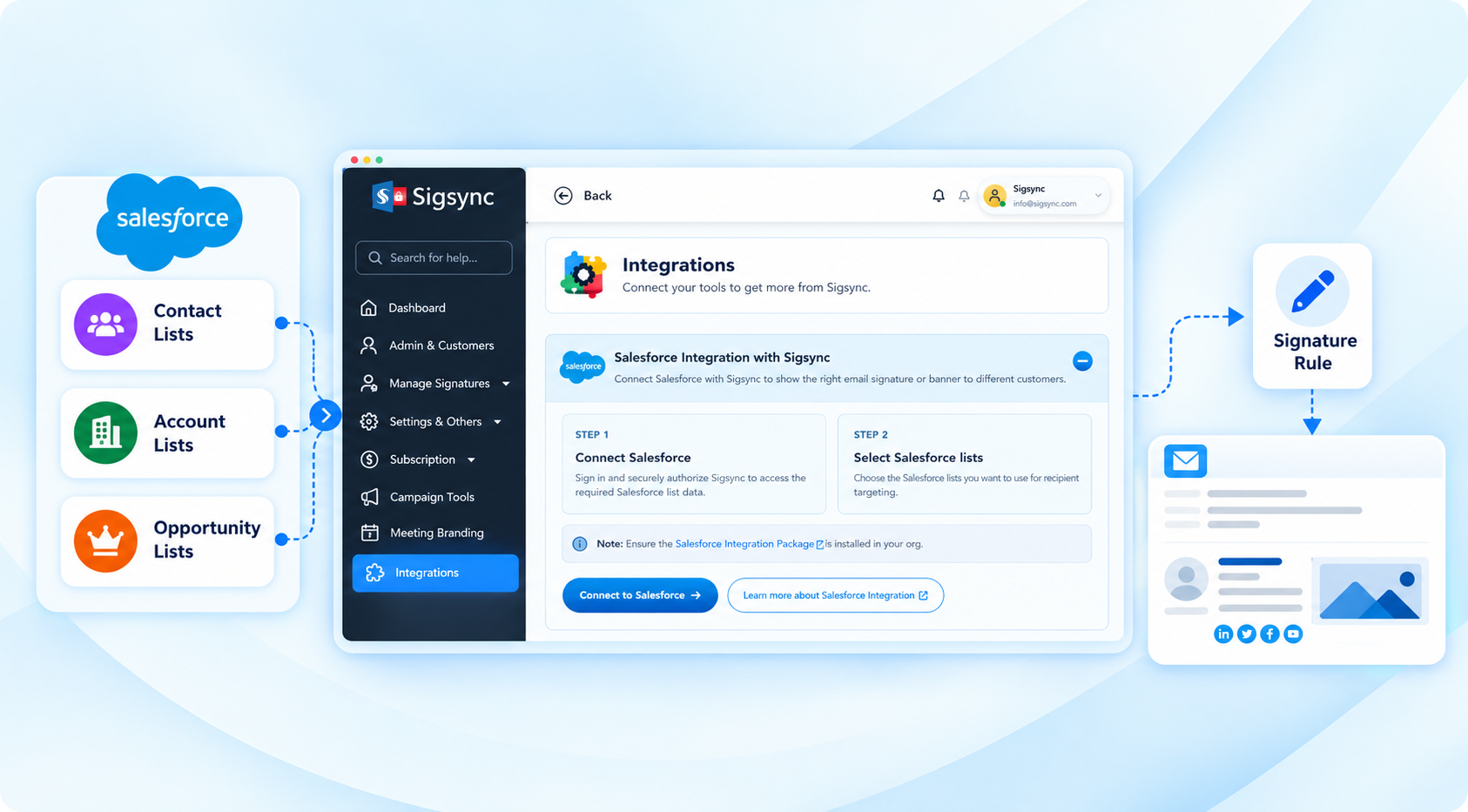
Use Salesforce lists to target the right signature content
The people receiving your emails do not always need to see the same message. Salesforce already organizes many of those audiences, while Sigsync controls the email signature that appears for them.
- Reuse Salesforce audiences: Work with the Contact, Account, and Opportunity lists your teams already maintain.
- Show relevant content: Match selected audiences with a suitable signature, promotional banner, resource, or call to action.
- Keep branding centralized: Manage signature templates and rules in Sigsync while Salesforce continues to manage the audience.
- Update targeting as Salesforce changes: Sync list updates so recent recipient changes are available to your signature rules.
What Salesforce Email Signature Integration does in Sigsync
Salesforce supplies the recipient audience and Sigsync supplies the signature logic. After you connect Salesforce and sync the required lists, a Salesforce list can be selected under the Recipients section of a Sigsync signature rule.
This keeps audience management and signature management separate. You can change a Salesforce list without redesigning the signature, and you can update the signature template without rebuilding the Salesforce audience.
Manages the audience
Contact lists
Account lists
Opportunity lists
List membership and updates
Manages the signature
Signature templates
Recipient conditions
Campaign banners
Rule priority and application
Target Contact, Account, and Opportunity lists
Contact lists
Use Contact lists when you want a signature or banner to be relevant to selected people, such as customers, prospects, event attendees, or other contact audiences maintained in Salesforce.
Account lists
Use Account lists when recipients associated with selected Salesforce accounts need different resources, service information, campaign content, or another audience-specific message.
Opportunity lists
Use Opportunity lists to show suitable signature content or banners to recipients associated with selected opportunities and related business requirements.
Show different content to different Salesforce audiences
Your main employee signature can remain consistent while the recipient-facing content changes for a particular audience. For example, you can:
- Show customer support or resource banners to selected Contact lists.
- Promote a webinar, event, or product to a relevant Salesforce audience.
- Use account-specific messaging for recipients associated with selected Accounts.
- Display opportunity-related campaign content without asking employees to manually switch signatures.
For multi-banner campaigns, you can also use Sigsync's rotating promotional banners with the signature template assigned to the rule.
How Salesforce integration with Sigsync works
Once the integration is available in your Sigsync account, the targeting flow is straightforward:
- Connect Salesforce with Sigsync.Authorize the Salesforce organization from the Sigsync Integrations section.
- Sync the Salesforce lists you need.Bring the required Contact, Account, and Opportunity lists into Sigsync.
- Select the Salesforce audience.Open the required signature rule and choose the list under Recipients > Salesforce.
- Assign the signature template.Choose the signature or banner content that should apply when the recipient matches the selected list and other configured rule conditions.
For package installation, Salesforce authorization, list synchronization, Force Sync, and the complete configuration walkthrough, see Salesforce Integration with Sigsync.
Keep Salesforce audience changes in sync
If you add new contacts, accounts, or opportunities in Salesforce, or update any of your list views, sync these changes with Sigsync. This ensures that the latest Salesforce records and list updates are available when configuring email signature rules.
When you need to refresh recent changes manually, use Force Sync. Maintain a minimum gap of 30 minutes between Force Sync requests. If only the membership of an existing Salesforce list changes, you do not need to recreate the signature template.
Built into Sigsync signature rules
Salesforce recipient targeting works with the same Sigsync signature rules used to control when signatures are applied. After synchronization, select the Salesforce list as a recipient condition and continue using the other rule settings that fit your organization.
If you are new to recipient-based targeting, see how Sigsync applies email signatures based on recipients.
Use Salesforce audiences in your Sigsync signature rules
Connect Salesforce, sync the lists your teams already manage, and use those audiences to deliver more relevant signature and banner content.
Experience Smarter Email Signatures with a
Free Sigsync Demo
Sigsync email signature service provides effortless, centralized signature management for Office 365 and Exchange.
Our team can assist you in quickly setting up company-wide signatures. Request a free on-demand demo to see
how Sigsync can simplify your email signature management process.