

Disable Native Outlook Signatures
Sigsync Office 365 Email Signature Software ensures consistent and centrally managed email signatures across Outlook and Outlook Web Access (OWA). When the Sigsync Signatures Outlook Add-in is deployed, it automatically overrides users’ native Outlook signatures to prevent conflicts and duplicate signatures during email composition.
To ensure this behavior, administrators must enable the option Disable end users’ native Outlook signatures in Outlook and Outlook Web Access (OWA) in Sigsync Settings. This option is enabled by default and should remain enabled unless there is a specific reason to allow native Outlook signatures.
How This Setting Works
When this option is enabled:
- Native Outlook signatures configured by end users are disabled.
- Sigsync-managed signatures are applied automatically.
- Duplicate or conflicting signatures are prevented.
- The behavior applies to both Outlook desktop and Outlook Web Access (OWA).
If this option has been manually disabled, it is recommended to re-enable it to ensure consistent signature application.
Steps to Disable Native Outlook Signatures Option in Sigsync
- Login to the Sigsync dashboard.
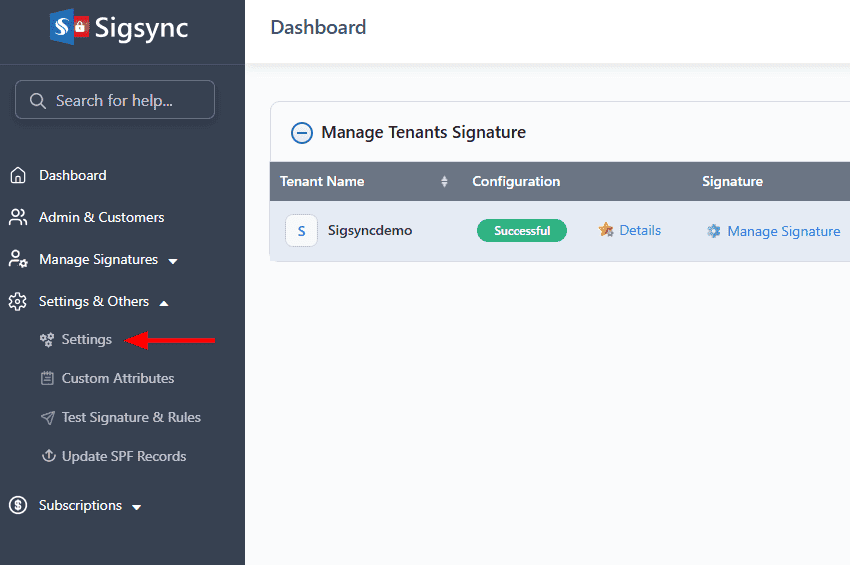
- Go to ‘Settings & Others’, then select the ‘Settings’ tab.
- Click the ‘Outlook Add-in’ tab and enable the option: ‘Disable end users native Outlook signatures in Outlook and Outlook Web Access (OWA)’.
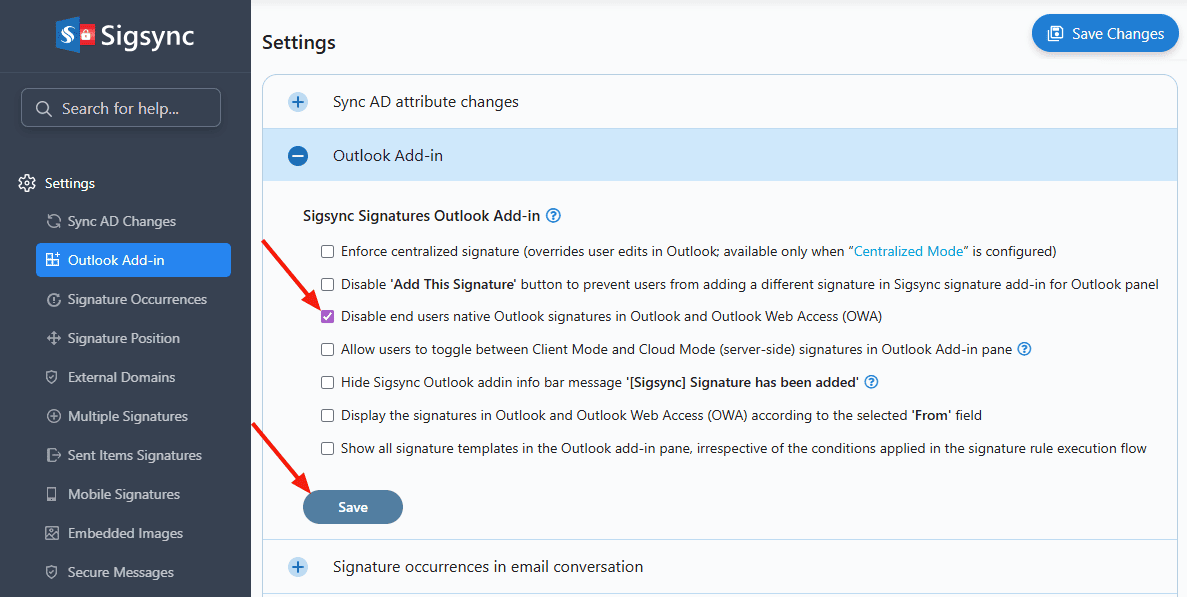
- Click the ‘Save’ button to apply the changes.
Client-Side vs Server-Side Behavior
Client-Side Mode (Outlook Add-in)
- Sigsync automatically overrides users’ default Outlook signatures.
- No additional action is required from end users.
- Ensure this option remains enabled in Sigsync Settings.
Server-Side Mode (Cloud Mode)
When signatures are applied using server-side mode, Outlook client signatures are not automatically disabled.
In this case, users may need to:
- Manually disable native Outlook signatures, or
- Use centralized management methods such as Group Policy or Intune.
Recommended Methods for Server-Side Mode
Use one of the following methods to disable native Outlook signatures when using server-side signatures:
In this manual

