

Prevent Users From Editing Signatures
Sigsync Office 365 Email Signature Software lets administrators prevent users from editing email signatures and ensure consistent, centrally managed signatures across all users.
‘Apply signatures centrally and prevent users from editing them in Outlook. Available only when “Centralized Mode” is configured’ option ensures that email signatures are strictly controlled through centralized configuration.
When this setting is applied:
- User edits to signatures in Outlook are automatically overridden
- Signatures are applied based on centrally configured rules
- Users cannot modify, replace, or remove assigned signatures
Behavior in Outlook Versions
New Outlook and OWA (Outlook Web App):
- The signature is automatically inserted during email composition
- If a user attempts to edit the signature, it will be overridden by the centralized configuration
- In the Sigsync Signatures Outlook Add-in pane, the ‘Add This Signature’ button is disabled, and the signature preview remains available.
Classic Outlook and Outlook Mobile App:
- Signature preview is not available while composing the email
- The signature is appended only after the email is sent (Server Mode).
Steps to Prevent Users from Editing the Signatures
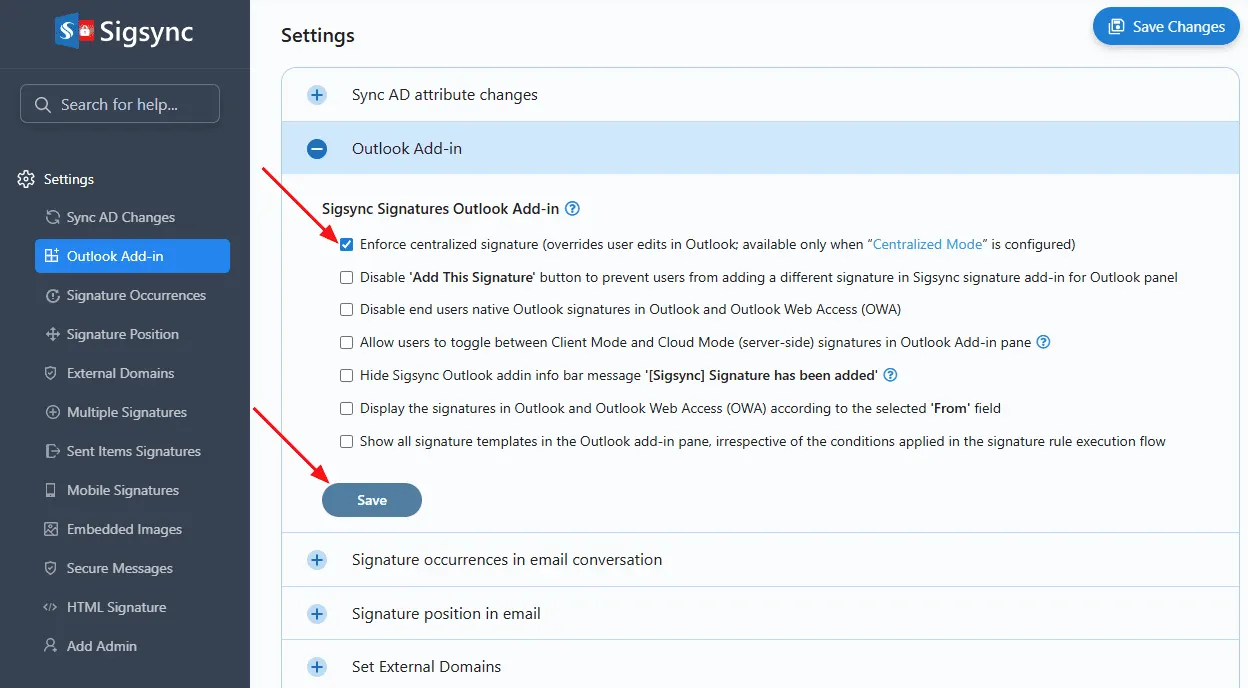
- Navigate to the ‘Settings & Others’ > ‘Settings’ from the Sigsync Dashboard
- Select the ‘Outlook Add-in’ tab.
- Check the option: ‘Apply signatures centrally and prevent users from editing them in Outlook. Available only when “Centralized Mode” is configured’
Useful Links:
In this manual

